

With countless cloud storage options available, choosing the best service for your photos can feel overwhelming. Whether you’re backing up cherished family memories or organizing a large digital collection, finding a reliable, secure, and user-friendly cloud storage platform is crucial. Your photos are priceless, and you want a solution that offers more than just convenience—permanence, security, and accessibility are key factors.
At Lessons with Lorrie, I help people safeguard their photos for future generations using FOREVER‘s permanent cloud storage, but let’s take a closer look at how to evaluate different cloud storage options to find the right one for you.
Key Factors to Consider When Choosing Cloud Storage for Photos
1. Storage Capacity and Pricing
The first thing to consider is how much storage you need. Different services offer varying amounts of free and paid storage.
- Free Plans: Many platforms offer free tiers, but these often have limited storage (5-15 GB), which may not be enough for large photo collections.
- Paid Plans: Look for a service that offers affordable, scalable storage. Some services charge monthly or yearly fees, while others, like FOREVER, offer a one-time payment for permanent storage.
Questions to Ask:
- How much storage is included in the free plan, if available?
- Are there affordable options for expanding storage as your photo library grows?
- Does the service offer flexible plans that fit your needs without excessive fees?
2. Security and Privacy
Your photos are personal, and you want to ensure they’re stored securely. Choose a service that offers strong encryption, privacy controls, and protection from unauthorized access.
- Encryption: Look for platforms that offer end-to-end encryption to protect your files both in transit and at rest.
- Privacy Policies: Ensure that the service has clear policies on data ownership. Some platforms may use your data for advertising or other purposes.
Questions to Ask:
- How is my data encrypted and protected?
- Who owns my photos? Do I retain full rights, or can the service access or use my images?
- Can I control who has access to my photos?
3. Backup and Sync Features
Seamless automatic backups are crucial for photo storage. You want a service that can easily sync across devices—whether it’s your phone, computer, or tablet—so you always have access to your most recent photos.
- Automatic Backups: Does the service offer automatic backups from your phone or computer, ensuring your latest photos are always saved?
- Cross-Device Syncing: Can you access your photos from any device, or are they tied to a specific platform (e.g., only available on Apple devices)?
Questions to Ask:
- Can I automatically sync my photos across multiple devices?
- How often are backups updated, and is it easy to restore files if needed?
- Are there apps or tools available for both mobile and desktop devices?
4. Ease of Use and Organization Tools
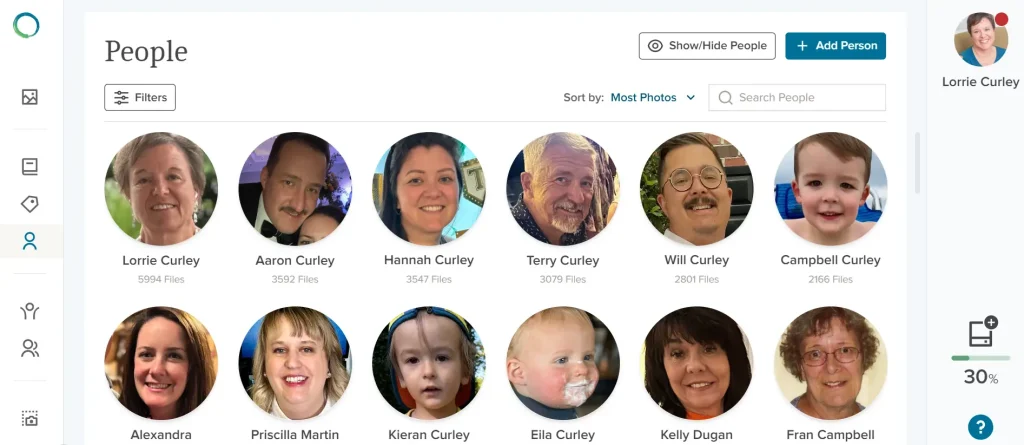
A good cloud storage platform should make it easy to organize, search, and retrieve your photos. Features like albums, tagging, and smart search tools are essential for keeping your collection organized. Facial Recognition is another helpful tool that identifies people in your photos and offers an easy and smart organizational tool.
- Folder Organization: Does the service allow you to create folders or albums to categorize photos by event, date, or person?
- Tagging and Metadata: Can you add tags or metadata to your photos to make them easier to find later? Some platforms also offer facial recognition or location-based tagging.
Questions to Ask:
- Is the user interface intuitive and easy to navigate?
- Are there tools to help organize large collections, such as albums or automatic sorting features?
- Can I easily search for specific photos using tags, dates, or locations?
5. Longevity and Data Retention
When choosing cloud storage, it’s important to think long-term. Some services may delete your files if you stop paying or if your account is inactive for too long. Others, like FOREVER, are built specifically for long-term photo preservation and guarantee that your files will be stored for at least 100 years.
- Subscription Models: Many services require ongoing payments to maintain access to your photos. FOREVER, however, offers a one-time payment for permanent storage, ensuring that your files are preserved without recurring fees.
- Data Retention Policies: Check how long the service will keep your photos if you stop paying or if your account remains inactive.
Questions to Ask:
- Will my photos be deleted if I don’t pay a subscription fee or if my account is inactive?
- Does the service guarantee long-term storage for future generations?
- What are the terms for keeping my files secure and accessible over time?
Popular Cloud Storage Options for Photos
Let’s compare some of the top cloud storage options based on the criteria above.
1. FOREVER
FOREVER is designed for permanent photo storage, offering a unique model where you pay once for lifetime access. Your photos are guaranteed to be stored and accessible for at least 100 years, making it ideal for families looking to preserve their memories for generations.
- Storage: One-time payment for permanent storage.
- Facial Recognition: Option to effortlessly organize and identify the faces in your photos.
- Security: Military-grade encryption, strict privacy controls, and full ownership of your data.
- Backup Features: Automatic backups available; easy organization with albums, tagging, and metadata.
- Longevity: Designed specifically for long-term storage with a guarantee of 100+ years.
Best for: Those who want a secure, long-term solution with no ongoing subscription fees.
2. Google Photos
Google Photos is a popular, user-friendly platform that offers automatic backups and smart organization tools like facial recognition. It offers free unlimited storage at a reduced resolution (photos compressed), but users must pay for original quality.
- Storage: 15 GB free, with paid plans for more storage.
- Security: Standard encryption, but data is integrated into the Google ecosystem, raising potential privacy concerns.
- Backup Features: Automatic backups from mobile and desktop, cross-device syncing, and smart search features.
- Longevity: Files are subject to Google’s terms and policies, which may change over time.
Best for: Casual users looking for smart features and convenience at an affordable price.
3. Apple iCloud Photos
For Apple users, iCloud Photos offers seamless syncing across all Apple devices, making it an excellent choice for those deeply integrated into the Apple ecosystem.
- Storage: 5 GB free, with paid plans for additional storage.
- Security: End-to-end encryption and Apple’s strict privacy controls.
- Backup Features: Automatic syncing across all Apple devices; well-integrated with macOS and iOS.
- Longevity: Tied to subscription payments; files may be deleted if payments lapse or the account is inactive.
Best for: Apple users who want seamless integration across their devices.
4. Amazon Photos
Amazon Photos is available free with an Amazon Prime membership, offering unlimited photo storage. It’s a great perk for Prime users, though it may not have all the advanced features of other services.
- Storage: Unlimited photo storage for Prime members.
- Security: Good encryption, but part of Amazon’s overall ecosystem.
- Backup Features: Automatic backups for photos, limited video storage.
- Longevity: Storage tied to Prime membership; may require ongoing payments.
Best for: Amazon Prime members looking for a value-added cloud storage solution.
Conclusion: How to Choose the Best Cloud Storage for You
Choosing the best cloud storage for your photos depends on your priorities—whether it’s affordability, long-term preservation, security, or ease of use. If you want to ensure your photos are stored safely for generations, FOREVER is a top choice for its permanent storage and unmatched security. For those who prefer seamless integration with existing devices, services like Google Photos, iCloud, or Amazon Photos offer convenient and affordable options.
At Lessons with Lorrie, I’m here to help you make the best choice for your needs, ensuring that your memories are not just organized but protected for life.
Search Title:
How to Choose the Best Cloud Storage for Your Photos | FOREVER vs. Google vs. iCloud
Meta Description:
Learn how to choose the best cloud storage for your photos. Compare top options like FOREVER, Google Photos, iCloud, and Amazon Photos to find the perfect fit.